Open source tools that cut AI costs.
These tools help every developer on your team spend less and move faster when working with AI assistants. They are free, open source, and work alongside whatever platform your team already uses.
Open source tools
Help your team work faster
These tools cut the cost and time of running AI assistants. They work on their own — and work within whatever rules Guard sets.
Agent Booster
Cut AI running costs by up to 15×
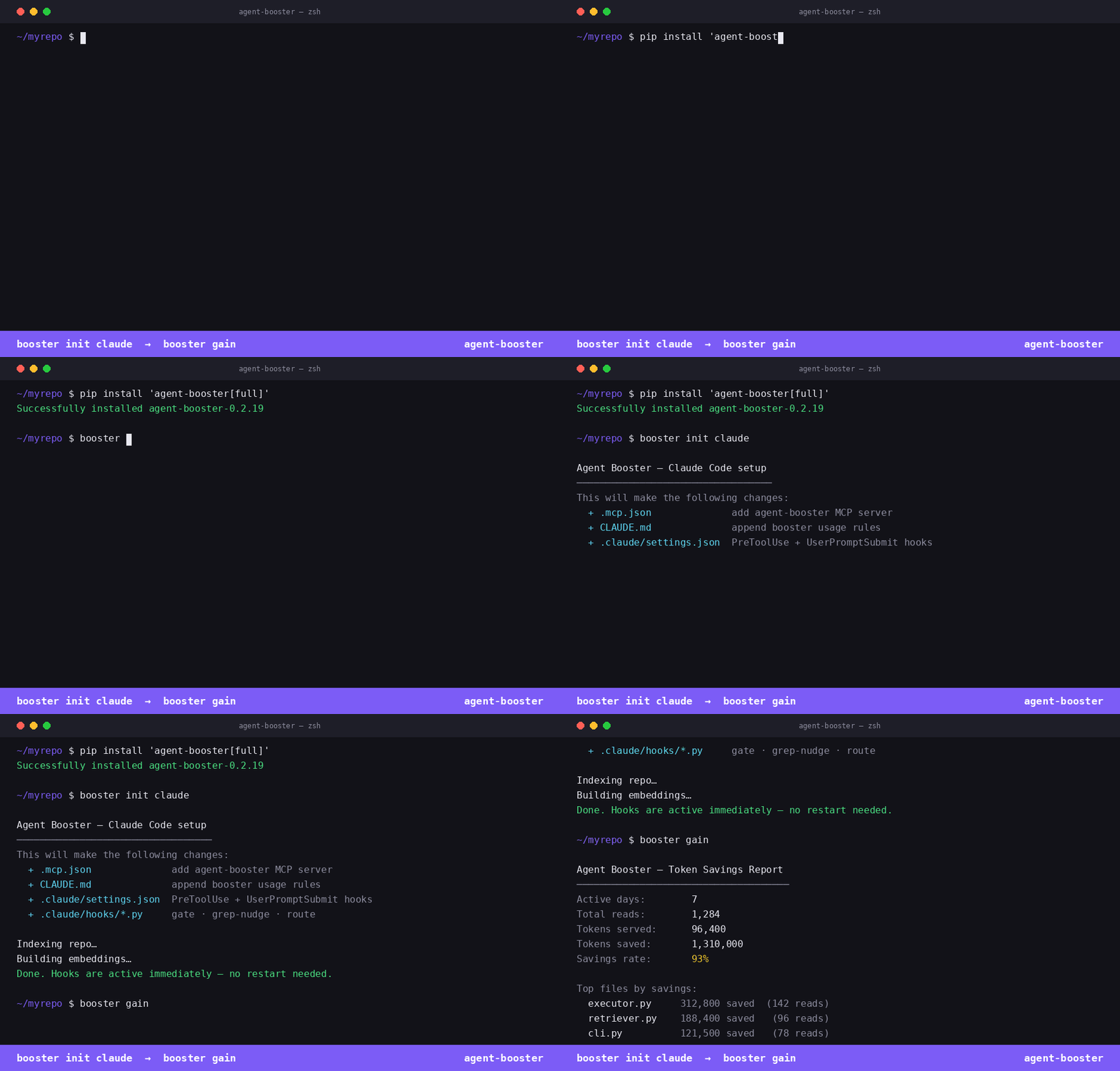
Instead of sending your whole codebase to the AI on every question, Agent Booster sends only the parts that matter. Less sent means less spent. It also picks the right AI model for the job — no more using the expensive one when a cheaper one would do.
What it does
- ✓Sends only the relevant code — not the whole file
- ✓Finds the right code by meaning, not just keywords
- ✓Picks the cheapest model that can handle the task
- ✓Shows you how much you've saved over time
Conduct CLI
Run agents. Enforce policies. Switch workspaces.
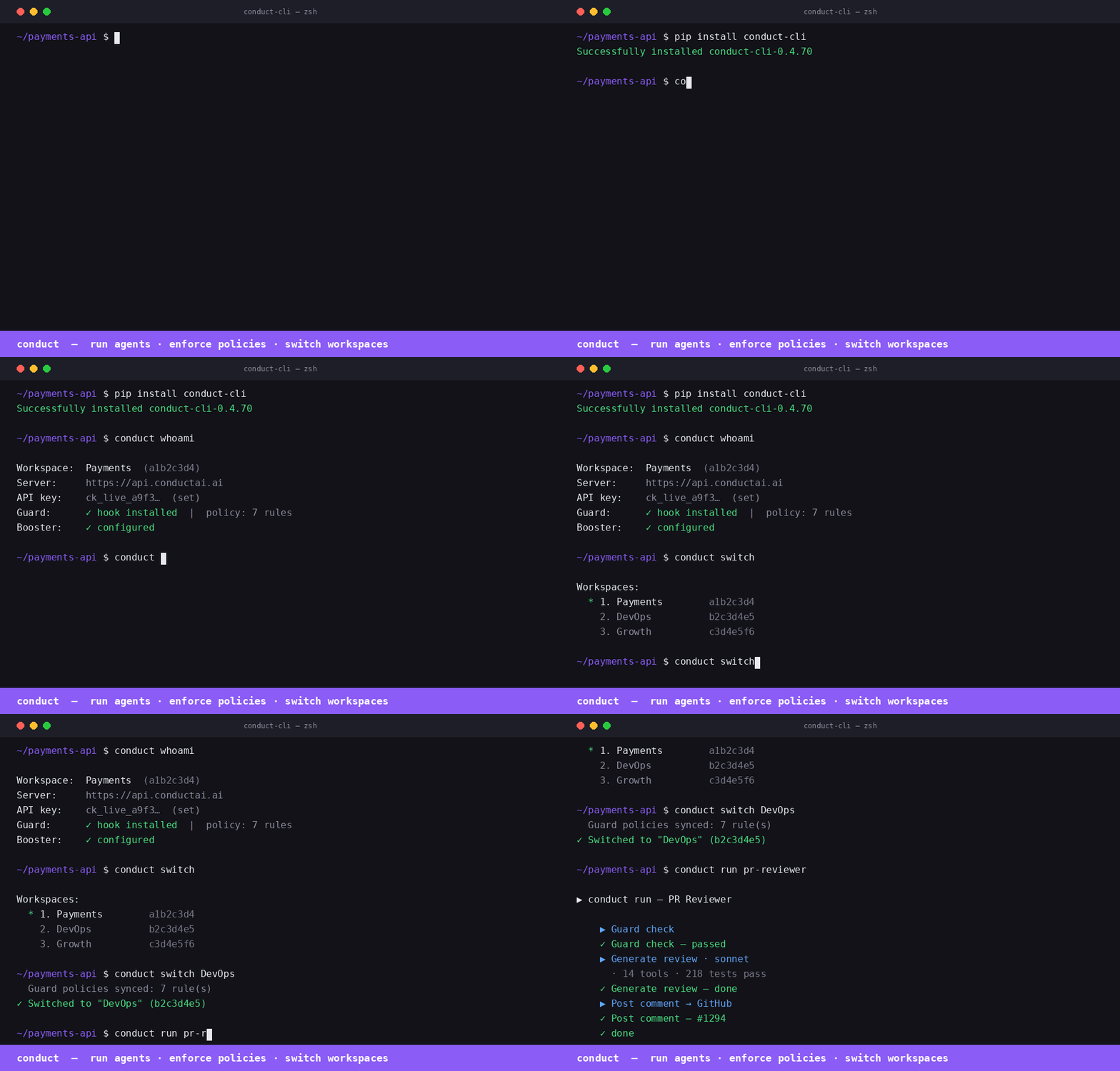
The daily driver for Conduct users. Run agents from the terminal, switch workspaces in one command, and enforce AI usage policies across the team with ConductGuard MCP — every tool call Claude makes passes through Guard first.
What it does
- ✓Run any agent from the terminal — picks up the right context automatically
- ✓conduct switch: swap workspaces + re-sync policies atomically
- ✓ConductGuard MCP enforces team AI policies on every tool call
- ✓conduct whoami: instant view of workspace, Guard, and Booster status
Security Loop
Finding to PR, automatically
Connect Claude Code, Codex, Cursor, or Windsurf to Conduct once. Every vulnerability they surface gets captured automatically, triaged, and routed through a fix pipeline — GitHub issue, agent fix, PR, Slack alert, full audit trail.
What it does
- ✓Passive hook captures findings from every tool call — zero developer action
- ✓BugHunter Active Scan runs 8 targeted hunt skills on demand
- ✓GitHub issue created with severity, labels, and suggested fix
- ✓Fix agent branches, patches, and opens a PR — you review, you merge
Session Report
Dev profile from your AI coding sessions
Run one command. Conduct analyses your local Claude Code transcripts using paxel, builds your builder profile — archetype, competency scores, signature moves — and sends the report straight to your admin. No data leaves your machine until you hit send.
What it does
- ✓Analyses local ~/.claude/projects transcripts — fully offline
- ✓Computes builder archetype: Execution · Planning · Engineering scores
- ✓Sends a formatted report to your admin via Slack
- ✓No install needed — paxel downloads on first run
conduct session-reportpip install conduct-cli==0.4.72Claude Code Team Kit
Shared Claude Code setup for your whole team
A ready-to-use setup for teams using Claude Code. Instead of every developer configuring things from scratch, this gives the whole team a shared starting point — the same rules, the same shortcuts, the same checks.
What's inside
- ✓Shared instructions so the AI knows how your team works
- ✓Pre-built shortcuts for common tasks
- ✓Automatic checks that run before risky actions
- ✓Roles for different team types — startup, SMB, enterprise
bash install.shGuard + tools together
Ship AI at scale — without blowing
your budget or hitting rate limits.
Guard gives your team lead one place to set the rules — how much any developer can spend, which actions are off limits, which AI tools are approved. These tools make sure every developer runs as efficiently as possible within those rules. The combination means your team can run dozens of AI workflows a day without budget surprises or rate limit failures.
Guard sets a spend limit per developer per day
Agent Booster cuts per-request cost by up to 15×
Result
The same budget covers 10× more workflow runs — every developer stays inside the limit without thinking about it.
Guard blocks unapproved AI tools team-wide
Claude Code Team Kit makes approved tools the default for everyone
Result
Developers get a ready-to-go setup that already matches Guard's approved tool list — zero friction, zero policy violations.
Guard logs every AI action across the whole team
RTK shrinks what the AI reads — 60–90% fewer tokens per run
Result
Fewer tokens means less to log, less rate limit pressure, and a cleaner audit trail — every run is faster and cheaper.
Guard pushes approved model tiers to every workflow
Agent Booster routes each task to the cheapest model that works
Result
Guard sets the ceiling. Agent Booster makes sure you never pay for a more expensive model than the task needs.
Guard wires PreCompact + SessionStart hooks into Claude Code
Agent Booster uses RRF fusion — vector + keyword ranks merged for every search
Result
Session context (budget, branch, policies) survives conversation compaction. Searches return better symbol matches by combining two ranking strategies automatically.
Ready to set this up for your team?
Start with Guard in Conduct — set your team's policies in minutes. Then give your developers these tools and they'll stay under budget automatically.
How to get started
Three steps. Three minutes.
Your whole team, in sync.
One person sets the rules. Everyone else joins with a single command. The tools stay in sync automatically.
Set the policies
Log into Conduct, open Guard, and configure your team's rules — daily spend limit, approved AI tools, blocked actions. Takes about five minutes. Only needs to happen once.
- ✓Set daily spend limit per developer
- ✓Choose approved AI tools for the team
- ✓Block risky actions across all workflows
- ✓Invite team members by email
Join and pull policies
Accept the invite, run one command. Conduct downloads your team's Guard policies and applies them to your local environment automatically. Nothing to configure manually.
# One command to join
conduct guard join
# Policies pulled automatically
✓ spend limit applied
✓ approved tools configured
✓ blocked actions enforced
Tools stay in sync
Agent Booster and other tools will optionally connect to the Guard policy server. When the team lead updates a rule, it propagates to every developer's tools automatically — no one needs to reconfigure anything.
- ◦Agent Booster respects spend limits automatically
- ◦Model routing follows Guard's approved tiers
- ◦Policy updates propagate in under 60 seconds
- ◦No manual reconfiguration for developers
Today: join + pull works. Tool sync on the roadmap.
Change a rule once. It updates everywhere.
When the team lead lowers the spend limit or adds a new blocked action, every developer gets the update the next time they sync — no Slack messages, no manual steps, no one left on an old policy.
Pick a tool. Start saving today.
Both tools are free and open source. Install one, try it, and see the savings.